JetBrains Marketplace Plugin

Compress Images
Without Leaving Your IDE

Stop context-switching. Right-click any image in your project tree, and MiConvert compresses it instantly — JPG, PNG, WebP.

Everything You Need

Powerful image compression that fits seamlessly into your JetBrains workflow.

One-Click Compression

Right-click any image file and select "Compress Image". That's it. No dialogs, no exports, no hassle.

🧠

Smart Engine

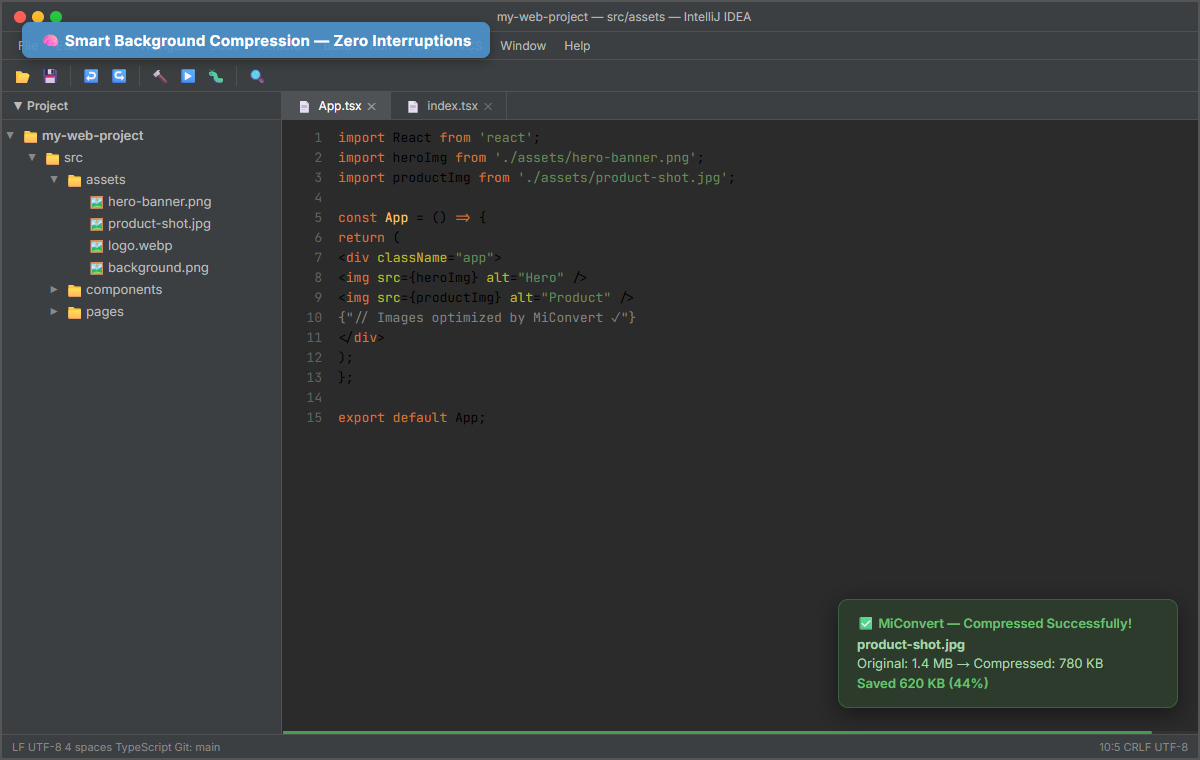
Files under 2MB are compressed silently in the background. You won't even notice — just smaller files.

🌐

Deep Web Integration

Heavy files (>2MB) are intelligently redirected to MiConvert.com's powerful cloud engine for deep optimization.

📁

Batch Processing

Right-click any folder to compress all images recursively. Perfect for cleaning up asset directories.

🎨

Multi-Format Support

Works flawlessly with JPG, PNG, and WebP formats. The most common image types in web projects.

⚙️

Fully Customizable

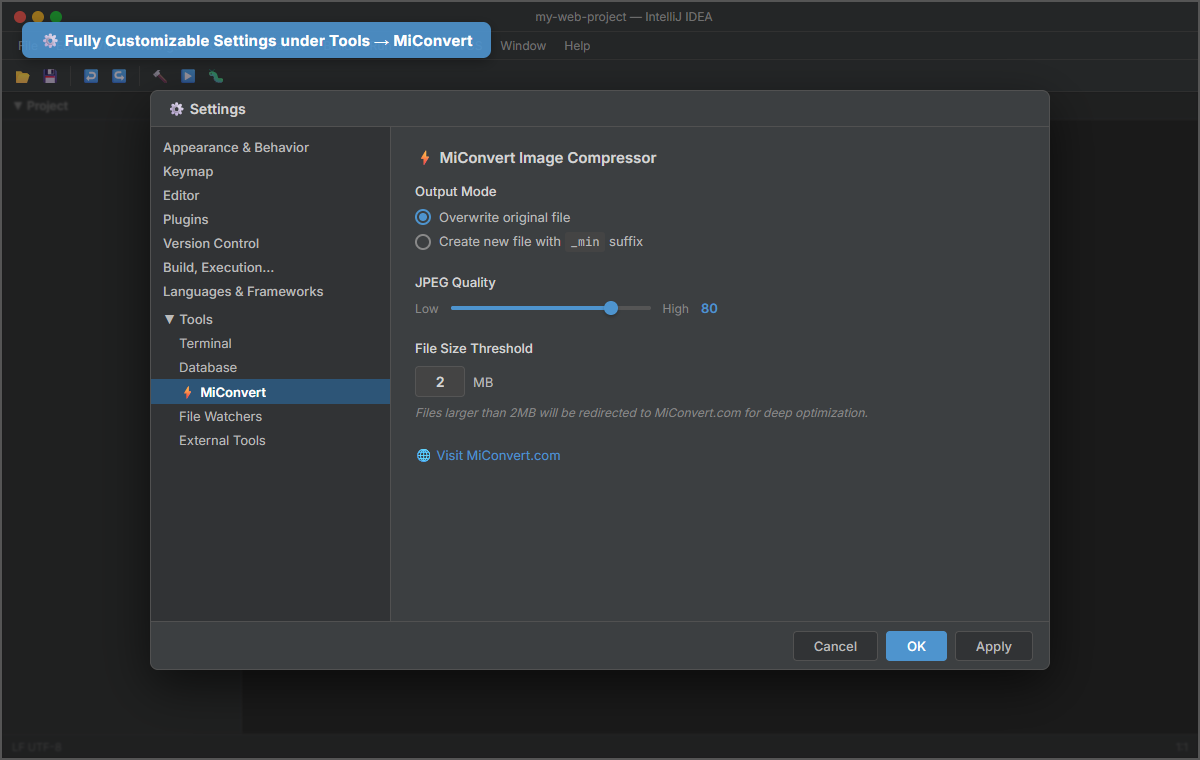
Choose to overwrite originals or create _min copies. Adjust JPEG quality. Your workflow, your rules.

How It Works

Three steps. Zero friction.

1

Right-Click

Select any image file or folder in your Project Tree

2

Compress

Click "⚡ Compress Image..." from the MiConvert menu

3

Done ✓

A notification shows how many KB you saved. That's it!

See It In Action

Native IDE experience — no popups, no interruptions.

my-web-project — src/assets — IntelliJ IDEA
FileEditViewNavigateCodeRefactorBuildRunToolsVCSWindowHelp
📂
💾
↩️
↪️
🔨
▶️
🐛
🔍
▼ Project
📁my-web-project
📁src
📁assets
🖼️hero-banner.png
🖼️product-shot.jpg
🖼️logo.webp
🖼️background.png
📁components
📁pages
📄App.tsx
📄index.tsx
📁public
📄package.json
📄 App.tsx
📄 index.tsx
1import React from 'react';
2import heroImg from './assets/hero-banner.png';
3import productImg from './assets/product-shot.jpg';
4
5const App = () => {
6 return (
7 <div className="app">
8 <img src={heroImg} alt="Hero" />
9 <img src={productImg} alt="Product" />
10 // TODO: optimize images before deploy
11 </div>
12 );
13};
14
15export default App;
LF UTF-8 4 spaces TypeScript Git: main 15:3 CRLF UTF-8
📋 Copy Ctrl+C
📄 Copy Path/Reference
📋 Paste Ctrl+V
✏️ Rename... Shift+F6
🗑️ Delete Delete
Compress Image...
📁 Compress All Images in Folder...
🔍 Find Usages Alt+F7
✅ MiConvert — Compressed Successfully!
product-shot.jpg
Original: 1.4 MB → Compressed: 780 KB
Saved 620 KB (44%)

Plugin Screenshots

See every feature in detail — right inside your JetBrains IDE.

⚡ Context Menu
✅ Compression Result
⚙️ Settings Page
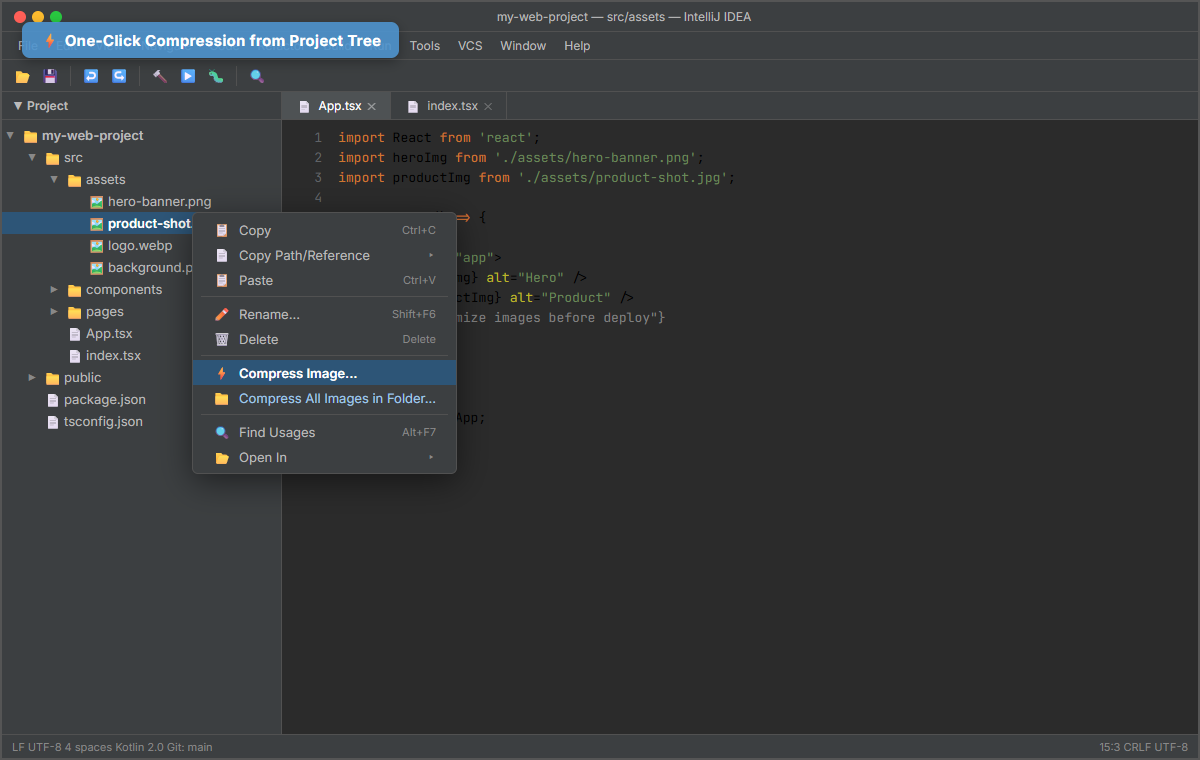
Right-click context menu showing Compress Image action in IntelliJ IDEA Background compression with success notification showing 44% savings MiConvert settings page under Tools with output mode and JPEG quality controls
Right-click any image → ⚡ Compress Image... — one click, instant compression

Works With Every JetBrains IDE

One plugin, all your favorite development environments.

💡 IntelliJ IDEA
🌐 WebStorm
🤖 Android Studio
🐘 PhpStorm
🐍 PyCharm
⚙️ CLion
🔷 GoLand
🟣 Rider
💎 RubyMine

Ready to Shrink Your Project?

Install the MiConvert plugin and start compressing images in seconds. Free and open source.